Why Do Contact Centre Agents Switch Between Screens?
Contact centre agents often switch between screens to find information. Learn ways to connect systems, simplify workflows, and improve agent productivity.

A customer in Melbourne calls for a comparison service. She wants to switch her electricity and gas to a cheaper deal and retain her pensioner concession: one call, one simple request.
For the agent, it’s six systems: the CRM, a meter lookup, the comparison engine, a concession check, the retailer’s sign-up portal, and a compliance script. Her details get typed three times. There’s dead air while portals load. A call that should take eight minutes runs past fifteen.
That’s why agents still switch between screens. Customer information, workflows, and business functions live in different systems, and the processes that connect with them were rarely designed around the agent. The agent becomes the connection between them.
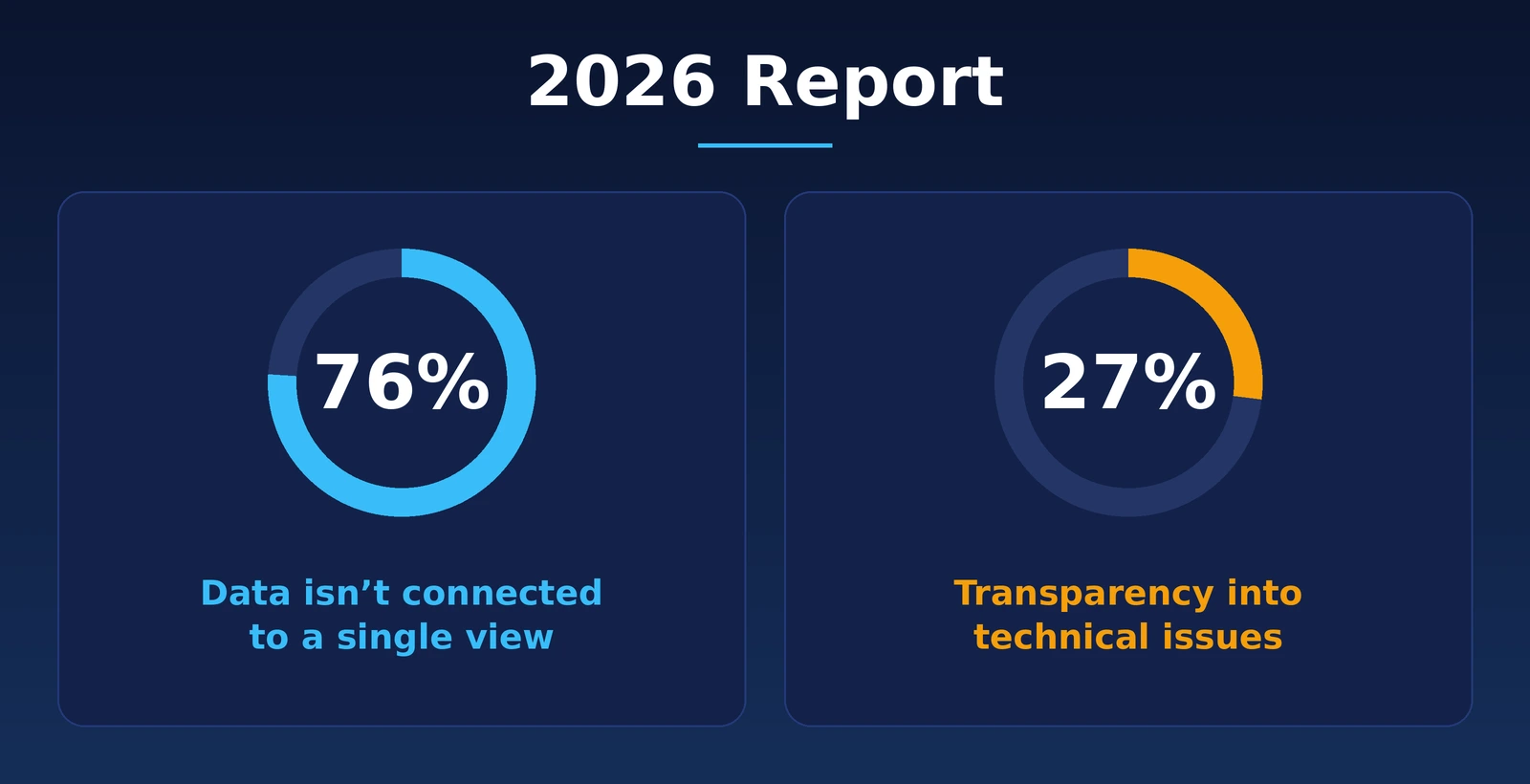
The 2026 Contact Centre Best Practice Report shows that this is part of a wider technology and visibility problem across Australian contact centres. Produced by SMAART Recruitment, the edition found that 76% of contact centres can’t connect customer, operational, and technical data into a single view. Only 27% have clear insight into the technical issues affecting customer interactions.
That matters because screen switching is rarely just a screen problem. It usually points to a deeper issue with how systems, information, and processes are connected.
TL;DR
- Screen switching is usually a process problem before it’s a technology problem. Fix the order of the work first, then decide what tech you need.
- Understand why agents move between systems during customer interactions.
- Reduce unnecessary searching, copying, and manual data entry.
- Lower the number of tools that agents need to manage.
- Increase the availability of customer information during the specific workflow.
- Use integration to connect systems rather than simply adding another application.
- Get visibility into the technical faults slowing your agents down. Evaluate the processes before rushing to the conclusion that new technologies are the only answer.
- Aim to make the agent workflow simpler, not just to cut the number of screens.
Why Do Contact Centre Agents Use Multiple Screens?
Most contact centres did not deliberately design a complicated agent desktop.
The complexity usually develops over time.
A business might have started with a CRM system years ago. Then it added a cloud contact centre platform. After that, it introduced a knowledge base, connected to a billing platform, and then added other applications for different teams or specific processes. Each step added layers. Each layer solved a particular need, but over time, the agent's desktop became harder to manage.
Agents had to switch between tools, so workflows became more complicated, and information was spread across different applications.
Here’s what an agent at an energy comparison service may need to do when a customer calls to switch their energy and gas:
- Open the customer's record.
- Update the new address.
- Look up the electricity and gas meter numbers in a separate tool.
- Copy both meter numbers into the comparison engine.
- Compare plans.
- Check the customer's concession card in another system.
- Log into the retailer's portal and re-enter the customer's details.
- Read the consent script word for word.
- Send a confirmation text from a separate platform.
- Return to the customer's record to document the interaction.
The customer doesn’t see those steps. The agent does.
Over hundreds of interactions, these small movements become part of the operating model.
What Causes Screen Switching in Contact Centres?
Several issues commonly contribute to fragmented agent workflows.
Legacy systems
Older platforms often remain because they are deeply embedded in business. Replacing them can be expensive, disruptive, or difficult.
That does not always mean the system itself has to disappear. The bigger question is whether agents still need to interact with it directly for every task.
Separate technology purchases
Different departments often buy technology for their needs. Sales may pick up a CRM. IT may implement a service management platform. Customer service may adopt a knowledge system. The contact centre may use another platform for voice and digital interactions. Without architecture, agents end up juggling all of them.
Limited integration
Two systems can technically be integrated without creating a good agent experience. An integration might transfer data behind the scenes while still forcing agents to open another app to finish a task. Good integration should lower effort inside the workflow, not simply allow systems to exchange data.
Complex processes
Sometimes the problem is not tech. If agents must follow a process, with many approvals, systems and manual checks, putting everything in one interface will not automatically fix it. The process itself needs attention as well.
Poor information management
Agents may have the information but still struggle to find it. When knowledge is spread across apps, documents, and internal resources, agents spend time searching instead of solving the customer’s problem.
Is Screen Switching Really a Productivity Problem?
It can be, but the number of screens isn’t the best measure. A contact centre could have several applications open and still provide an efficient experience if the systems are well connected, and the agent can move through the workflow easily.
The real issue is unnecessary effort. Consider two different workflows.
In the first one, the agent receives customer interaction, and the relevant customer information, history, and knowledge appear within the working environment. The agent completes the required action and records the outcome.
In the second workflow, the agent receives the interaction, searches for the customer, opens another system for account information, searches a knowledge base, copies information into a case, and then returns to the original application.
It seems like both systems are equally capable, but the second one requires much more effort from the agent. That extra effort shows up as longer average handling times, more after-call work and increased chances of mistakes and frustration during difficult conversations.
What Does the 2026 Report Tell Us?
What the numbers mean
76%: Data isn’t connected to a single view: Most contact centres can’t bring CX outcomes, operational metrics, and technical performance data together. If leaders can’t see it one place, agents usually can’t either.
27%: Transparency into technical issues: Most contact centres do not have full visibility into the technical problems affecting customer interactions. That makes it harder to separate genuine technology issues from agent performance issues.
The bigger point: Screen switching is often a symptom of a wider technology and visibility problem. When information systems, data, and processes aren’t linked to each other, agents have to carry this complexity throughout the entire process of interaction with customers.
Does CRM Integration Solve the Multiple-Screen Problem?
CRM integration helps, but it’s not a complete solution.
A CRM can provide customer history, account information, interaction records, and another important context. Bringing that information into the agent's workflow can reduce unnecessary searching.
But agents may still need access to other systems.
For example, the CRM might show the customer account but not provide the tools required to change a service, process a payment, or troubleshoot a technical issue.
The goal should be connected to workflows, rather than simply CRM integration.
Ask:
- Can agents access the information they need at the right point?
- Can they complete common actions without unnecessary application switching?
- Does customer information move between systems automatically?
- Can agents see relevant knowledge without leaving the interaction?
- Are updates recorded consistently across the required systems?
These questions provide a better view of integration quality than simply asking whether two platforms are connected.
What is a Unified Agent Desktop?
A unified agent at a desktop brings the tools and information an agent needs into a more connected working environment.
It does not necessarily mean replacing every existing application.
Depending on the technology architecture, a unified desktop may bring together:
- Customer information
- Interaction history
- Contact centre controls
- Knowledge
- Case information
- Customer authentication
- Workflow actions
- Agent guidance
- Relevant business applications
The purpose is simple: help the agent complete the interaction without constantly becoming the system integrator.
This becomes particularly important as contact centres introduce more automation and AI.
Adding AI to a fragmented environment can create another destination for agents to visit. If an AI assistant requires agents to leave their existing workflow, copy information, and check out another interface, some of the benefits are lost.
Can AI Reduce Screen Switching?
Yes, but only when it is built into the workflow.
AI can help agents retrieve knowledge, summarise interactions, identify relevant information, and provide guidance during a conversation.
The technology becomes more useful when those capabilities appear where the agent is already working.
For example, an agent should not necessarily have to:
Open AI tool -> copy customer question -> request answer ->copy response -> return to CRM
A better workflow could provide relevant guidance within the existing interaction.
The same principle applies to call summaries, knowledge retrieval, and next-best actions.
AI should reduce work around the conversation rather than create another system the agent has to manage.
How Does Screen Switching Affect the Customer Experience?
Customers generally don’t care about which applications an agent uses. They care whether the agent understands the issue, has the right information, and can resolve it without unnecessary delays.
When agents have to move between multiple systems, customers may experience:
- Longer conversations
- Repeated questions
- Transfers between teams
- Delayed answers
- Inconsistent information
- Longer waits while agents check another system
The problem becomes more noticeable when customers have already provided information that exists somewhere inside the organisation, but the agent cannot easily access it.
A technology issue can quickly become a customer experience issue. The more effort an agent needs to find information, update records or complete a simple action, the more likely that friction is to reach the customer.
How Can Contact Centres Reduce Screen Switching?
Reducing screen switching does not always mean replacing existing technology. Start by understanding where the friction comes from and which parts of the workflow create unnecessary movement between systems.
Map the real agent workflow
Choose a few common tasks and trace how agents use different systems to complete them throughout the whole process.
Make sure you do not “just” rely on process or systems charts.
The same task may look like a three-step procedure on paper but may require multiple applications, manual searching, copy-pasting, and other workarounds.
Identify unnecessary movement
Unnecessary things like:
- Repeated login processes
- Copying and pasting information
- Duplicate data entries
- Switching applications to perform simple tasks
- Searching for information in multiple sources
- Information that exists but is difficult to access
These actions help identify where technology adds work for agents instead of reducing their workload.
Fix the process before adding technology
Go back to the energy comparison call. Before buying anything, ask which of those ten steps need to happen on the call at all.
The meter lookup doesn’t. If the customer gives her new address when she books a callback, the lookup can be done before the agent dials. The same tools, different orders, and the longest step is gone.
The concession check and the consent script do need to happen live. Retyping details into the retailer’s portal is a genuine integration gap, and that’s where technology earns its place.
Sorting process problems from technology problems first means you only spend money on the ones that need it.
Improve integration between systems
Where systems need to remain in place, examine how information and actions move between them.
The objective is not integration for its own sake. The objective is to reduce the amount of manual work agents have to perform when moving between systems.
For example, if an agent must repeatedly copy customer information from one application into another, the workflow may benefit more from better integration than from another standalone tool.
Make knowledge easier to access
Agents should not have to search through multiple knowledge sources to answer common customer questions.
A well-managed knowledge environment can make information easier to find, support more consistent responses, and reduce the time agents spend searching during an interaction.
Measure the workflow after changes
Average handling time (AHT) alone will not show whether screen switching has actually been reduced.
Look at some measures like:
- After-call work
- Transfer rates
- First contact resolution
- Error rates
- Agent adoption
- Customer effort
- Time spent searching
- Application or system-related incidents
Agent feedback is also important. Agents often know which parts of the workflow create the most friction because they deal with those problems every day.
The goal is not simply to give agents fewer screens. It is to make the work between those screens simpler, faster, and easier to manage.
When Should a Contact Centre Change its Technology?
Not every multiple-screen environment requires a platform replacement. A technology change becomes more compelling when the existing architecture prevents the business from improving the workflow.
Some signs:
- Critical systems cannot integrate effectively.
- Agents rely heavily on manual workarounds.
- Customer information is inconsistent between platforms.
- Important processes require repeated application switching.
- New capabilities cannot be added without creating more complexity.
- Technical problems are difficult to identify.
- Reporting is fragmented across systems.
- The current environment limits future automation.
The 2026 report’s findings on technology visibility are relevant here. If organisations cannot clearly connect technical conditions with customer and operational outcomes, it becomes difficult to know which technology problems deserve investment first.
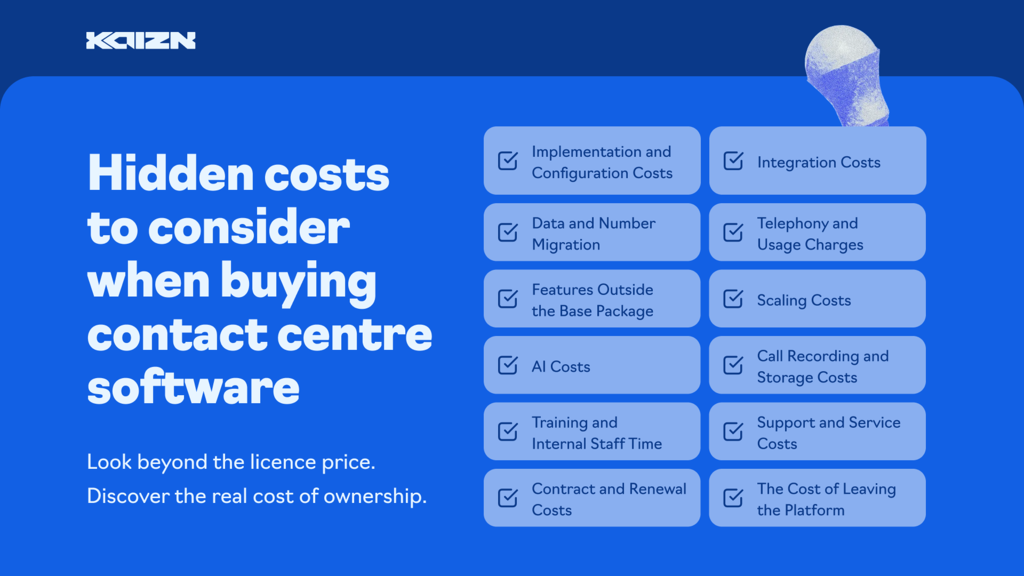
Before making a purchasing decision, explore our guide to the hidden costs of contact centre software.
What Should Contact Centre Leaders Look First?
Start by examining what agents do during a typical call.
That might include searching for information waiting for a system to respond, entering the details more than once, or switching between different applications.
Then figure out why that friction exists.
Sometimes the problem is integration.
Sometimes it is a process design.
Sometimes it is knowledge management.
Sometimes the technology needs to be updated.
Often, it is a mix of several factors.
The 2026 report also shows that the industry is making progress on frontline retention.
Seventy-nine percent of new frontline agents are still in their roles after 12 months.
That’s the best result in the report’s seven years. It means the agent's experience matters more than productivity.
Technology that makes the job easier can support onboarding, build confidence, and improve usability.
How Kaizn Supports Contact Centre Technology Decisions
Technology decisions should start with the way the contact centre operates.
Kaizn works with contact centres to assess technology environments, workflows, integrations and operational requirements before recommending a path forward.
That may mean improving an existing technology stack, connecting systems more effectively, or identifying where a broader technology change makes sense.
For businesses that are evaluating their current technology capabilities, Kaizn's guide about selecting the right technology stack for contact centres offers extra information about evaluation of integrations, scalability, workflows, and platform suitability.
FAQs
Why do contact centre agents use multiple screens?
Agents use multiple screens because customer information, communication tools, knowledge, billing, case management, and other business functions are often stored in separate systems. Limited integration forces agents to move between those systems during an interaction.
Does a unified agent desktop eliminate all screen switching?
Not necessarily. A unified agent at a desktop aims to bring important information and actions into a more connected workflow. Some specialist applications may still be required, but unnecessary switching can be reduced.
How does screen switching affect contact centre performance?
Unnecessary screen switching can increase the time agents spend searching, entering information, and completing administrative tasks. It can also contribute to errors, longer interactions, and a more difficult agent experience.
Can AI reduce the number of screens agents to use?
Yes. AI can reduce searching and manual work when capabilities such as knowledge retrieval, summarisation, and agent guidance are embedded directly into the agent workflow. AI can also add complexity when it operates as another separate destination.
Should a contact centre replace its CRM to reduce screen switching?
Not automatically. The first step should be understanding the current workflow and identifying whether the problem is caused by poor integration, process complexity, information management, or limitations in the existing technology.
How can contact centres identify unnecessary screen switching?
Map real agent workflows for common interactions and record every application; search, manual entry and system change required to complete them. Then identify which steps can be removed, automated, integrated, or simplified.
Final Takeaway
Agents in contact centres often switch between multiple screens because the technology supporting customer interactions is fragmented. This creates unnecessary work, slows down processes, and makes it harder for agents to access the information they need during a conversation.
Improving the agent's experience requires systems to share information, workflows to function effectively, and relevant information, insights, and actions to be available when needed. Technical issues also need to be addressed so agents can work efficiently and give customers the attention they deserve.
Kaizn helps contact centres identify gaps in their technology and workflows, then develop practical solutions to reduce unnecessary workload, improve day-to-day processes, and enhance the overall customer experience.





.png)